
Answer‑first overview
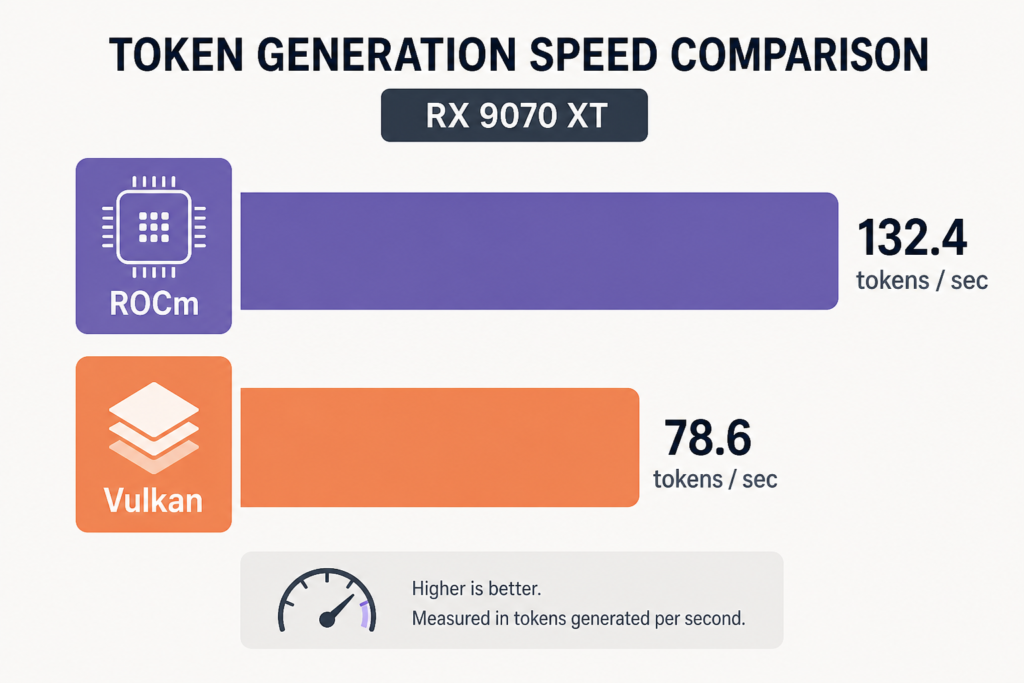
The AMD Radeon RX 9070 XT delivers solid 1440p and 4K gaming and is one of the fastest 16 GB GPUs for local AI. It offers ~92 tok/s on 20B open‑source LLMs via ROCm and ~137 tok/s on 7B models via Vulkan, but VRAM limits cap multi‑dozen‑billion models.
This post may contain affiliate/partner links. If you buy or sign up through them, we may earn a commission at no extra cost to you.
What is the RX 9070 XT and who should consider it?
The RX 9070 XT is a desktop GPU built on AMD’s RDNA 4 architecture, offering 64 compute units, 16 GB of GDDR6 memory, 640 GB/s bandwidth, and powerful AI matrix engines up to 1557 TOPS INT4 with sparsity ([amd.com](https://www.amd.com/en/products/graphics/desktops/radeon/9000-series/amd-radeon-rx-9070xt.html)). Released March 6 2025 with a US SEP of $599 ([gamersnexus.net](https://gamersnexus.net/gpus/amd-rx-9070-9070-xt-gpu-prices-specs-release-date)), it’s positioned as a mid‑range option combining gaming and local AI workloads.
How does it perform in gaming?
In 1440p gaming across 18 titles, RX 9070 XT averages 119 fps, about 6 % slower than RTX 5070 Ti ([techspot.com](https://www.techspot.com/review/2961-amd-radeon-9070-xt/)). At 4K, it closes the gap to just 1 % behind, while outperforming some previous AMD cards like the 7900 XT by ~9 % ([techspot.com](https://www.techspot.com/review/2961-amd-radeon-9070-xt/)). Power draw runs in line with expectations (~300 W) ([amd.com](https://www.amd.com/en/products/graphics/desktops/radeon/9000-series/amd-radeon-rx-9070xt.html)). It delivers competitive value if gaming and AI are both on your radar.
Is the RX 9070 XT good for local AI? What real benchmarks say
Yes—particularly for models that fit within 16 GB of VRAM.
Benchmarks via Ollama + ROCm (Linux)
Community benchmarks show ~91.9 tok/s on a 20B GPT‑OSS model, ~57.8 tok/s on Qwen3.5 9B, and ~52.2 tok/s on Qwen3 14B via ROCm on Ollama ([localaimaster.com](https://localaimaster.com/blog/rx-9070-xt-local-ai)). A dense 27B model spills to RAM and collapses to ~6.3 tok/s ([localaimaster.com](https://localaimaster.com/blog/rx-9070-xt-local-ai)). These figures reflect a highly capable 16 GB card for inference in the 9–20 B range.
Vulkan vs ROCm on llama.cpp (7B benchmarks)
On vanilla llama.cpp benchmarks, Vulkan delivers ~137 tok/s for 7B Q4_0 models, while ROCm yields ~97–101 tok/s—prompt‑processing speeds are equal (~5,000 tok/s) ([turbollm.dev](https://turbollm.dev/gpu/rx-9070-xt)). Vulkan currently leads in generation speed, though this gap may narrow with updates.
Model compatibility and limits
With 16 GB VRAM, the RX 9070 XT can fit a large share of popular models: 254 of 342 tested models at Q4 in one dataset ([localai.computer](https://localai.computer/gpus/rx-9070-xt?utm_source=openai)). Dense models up to ~29–30 B parameters at 4‑bit quant can fit in RAM, but 70 B models remain out of reach ([localai.computer](https://localai.computer/gpus/rx-9070-xt)).
TurboLLM notes that sparse MoE models like 35B‑A3B can run at Q3 with expert offload, or Q4 with fuller offload if you have enough system memory ([turbollm.dev](https://turbollm.dev/gpu/rx-9070-xt)).
How to set up RX 9070 XT for local AI?
- Install ROCm 7.x on Linux (Ubuntu preferred)—official support for RX 9070 XT (gfx1201) is in ROCm 7 ([rocm.docs.amd.com](https://rocm.docs.amd.com/_/downloads/radeon/en/docs-6.4.1/pdf/)).
- Install Ollama with ROCm support: use the `ollama/ollama:rocm` Docker image or ROCm install path ([localaimaster.com](https://localaimaster.com/blog/rx-9070-xt-local-ai)).
- Alternatively, use llama.cpp with Vulkan backend—no special drivers required—and benchmark both backends to pick the fastest in your setup ([turbollm.dev](https://turbollm.dev/gpu/rx-9070-xt)).
- Choose models within VRAM limits (ideally ≤20B dense). For larger models, consider sparse MoE variants or expert offload strategies ([turbollm.dev](https://turbollm.dev/gpu/rx-9070-xt)).
- Benchmark using sample suites (e.g. hirokuze’s 43‑question test) to validate performance and quality ([github.com](https://github.com/hirokuze/local-llm-benchmark-rx9070xt)).
Trade‑offs: RX 9070 XT vs other GPUs
| Aspect | RX 9070 XT | RTX 5070 Ti 16 GB |
|---|---|---|
| AI tokens/sec (20B model) | ~92 tok/s (ROCm) | Lower (NVIDIA benchmarks) |
| Gaming performance | Slightly slower (~6 % at 1440p) | ~Equal or slightly faster |
| Software ecosystem | Still maturing (ROCm, Vulkan user workarounds) | More mature (CUDA tools, fine‑tuning support) |
| Price | Launched at $599; street prices ~$699–799 | Launched higher; current similar price or higher |
Choice depends on your needs: pick RX 9070 XT for fast inference on Linux at a better price; pick RTX 5070 Ti for access to more mature CUDA-based tooling or quieter, lower TDP builds ([craftrigs.com](https://craftrigs.com/reviews/rx-9070-xt-review-local-llm/)).
Common questions about RX 9070 XT and local AI
What’s the sweet‑spot model size?
Dense models up to ~20B fit well. Sparse MoE up to 35B can work with offload; dense 27B or 70B will bottleneck badly or fail due to VRAM limits ([localaimaster.com](https://localaimaster.com/blog/rx-9070-xt-local-ai)).
Should I prefer ROCm or Vulkan?
Vulkan currently offers faster token generation, but ROCm gives full access to Ollama ecosystem. Benchmark both in your environment ([turbollm.dev](https://turbollm.dev/gpu/rx-9070-xt)).
Does it handle long contexts?
Prompt/prefill speeds (~5k t/s) are very fast—good for long contexts—but model size still caps capacity. Offload helps but adds complexity ([turbollm.dev](https://turbollm.dev/gpu/rx-9070-xt)).
Summary
The RX 9070 XT is a dual‑purpose GPU: solid 1440p/4K gaming, and among the fastest 16 GB options for local LLM inference in 2026. You’ll get ~90+ tok/s on 20‑B LLMs via ROCm, ~130+ on 7‑B via Vulkan, if you’re mindful about VRAM. Setup is reasonably straightforward on Linux. For a balanced gaming+AI build under $800, it’s one of the strongest choices right now.
Frequently Asked Questions
- Can the RX 9070 XT run a 70 B LLM?
- No—dense 70B models require ~40 GB VRAM and are not usable. Sparse MoE variants fare better, but dense 70B is beyond practical limits ([turbollm.dev](https://turbollm.dev/gpu/rx-9070-xt?utm_source=openai)).
- How much faster is Vulkan vs ROCm?
- On 7B Q4_0 models, Vulkan shows roughly ~35 % higher throughput (~137 t/s vs ~100 t/s) while prompt handling speeds remain equal ~5k t/s ([turbollm.dev](https://turbollm.dev/gpu/rx-9070-xt?utm_source=openai)).
- Do I need Linux?
- Yes for best experience. ROCm support is full on Linux; Windows requires workarounds (Vulkan via llama.cpp). Ollama Windows support is limited ([localaimaster.com](https://localaimaster.com/blog/rx-9070-xt-local-ai?utm_source=openai)).
- How does gaming stack up?
- Good 1440p and 4K performance—only a few percent behind RTX 5070 Ti, competitive for price ([techspot.com](https://www.techspot.com/review/2961-amd-radeon-9070-xt/?utm_source=openai)).
- Is the RX 9070 XT good value?
- Launched at $599, still generally sells for under $800. For a card that bridges gaming and AI workloads, it offers strong mid‑range value ([craftrigs.com](https://craftrigs.com/reviews/rx-9070-xt-review-local-llm/?utm_source=openai)).
About the Author
cloudgpuhub.com – Nhon Dang is a cloud infrastructure and operations professional with over 10 years of hands‑on experience in cloud services, infrastructure, and business operations. His expertise spans the design, deployment, and operation of cloud platforms and managed services, including virtual machines (VMs), Kubernetes (K8s), object storage (S3), managed databases, Apache Kafka, and cloud GPU infrastructure. Throughout his career, Nhon has worked closely with cloud infrastructure and service operations, gaining practical experience in building reliable, scalable, and cost‑efficient cloud environments. His work combines technical expertise with business and operational insight, giving him a practical perspective on how cloud technologies perform in real‑world production environments. Nhon writes about cloud infrastructure, Kubernetes, DevOps, distributed systems, cloud computing, infrastructure operations, and cloud service management, sharing insights based on hands‑on experience rather than purely theoretical knowledge. His goal is to provide practical, technically accurate, and experience‑driven guidance that helps engineers, technical teams, and businesses make better decisions when adopting and operating cloud technologies.