

Last updated: September 4, 2026
Lambda Labs is a GPU cloud provider purpose-built for AI and machine learning workloads, offering on-demand and reserved NVIDIA GPU instances at prices that consistently undercut the major hyperscalers by 40–70%. If you need raw GPU compute for training, fine-tuning, or large-scale inference—and you don’t need tight integration with AWS, GCP, or Azure ecosystems—Lambda is worth serious consideration.
This post may contain affiliate/partner links. If you buy or sign up through them, we may earn a commission at no extra cost to you.
This review is based on documented pricing, published specifications, and publicly available technical information. Where claims reflect hands-on configuration rather than verified production benchmarks, that is noted explicitly.
What Is Lambda Labs?
Lambda Labs is a San Francisco-based AI infrastructure company founded in 2012. It originally built its name selling GPU workstations and servers for deep learning research. In 2021 it launched Lambda Cloud, a cloud GPU platform targeting AI teams who found AWS EC2 P-class and GCP A100 instances prohibitively expensive. Today Lambda operates GPU clusters in multiple US data centers and select international regions, offering on-demand instances, reserved capacity, and large-scale private clusters (Lambda On-Demand Clusters / Hyperplane).
Who Is Lambda Labs Best For?
- AI/ML researchers and engineers who need access to high-end GPUs (H100, A100, A10) without a cloud commitment or enterprise contract.
- Startups and scale-ups fine-tuning foundation models or running inference at scale on a tight budget.
- Teams that don’t need deep cloud-native services (managed databases, serverless, IAM policy trees) and just want fast GPU VMs with SSH access.
- Enterprise AI teams that need dedicated multi-node H100 clusters with InfiniBand for distributed training.
Lambda is not the best fit for teams whose workloads span GPU compute and heavy cloud-native services in the same workflow—you’ll pay a complexity tax integrating Lambda with S3, RDS, or similar managed services from other providers.
Lambda Labs GPU Instance Types and Pricing
Lambda’s pricing model is straightforward: hourly on-demand rates and 1-year or 3-year reserved pricing. There are no egress-heavy surprise charges by default, and storage is billed separately but cheaply. The table below reflects publicly listed on-demand pricing. Verify current rates on Lambda’s official pricing page before committing, as GPU cloud pricing is highly dynamic.
| Instance Type | GPU | GPU Count | GPU VRAM | vCPUs | RAM | On-Demand Price (approx.) |
|---|---|---|---|---|---|---|
| gpu_1x_h100_sxm5 | H100 SXM5 | 1 | 80 GB | 26 | 200 GB | ~$2.49/hr |
| gpu_8x_h100_sxm5 | H100 SXM5 | 8 | 640 GB | 208 | 1.8 TB | ~$19.92/hr |
| gpu_1x_a100_sxm4 | A100 SXM4 | 1 | 40 GB | 30 | 200 GB | ~$1.29/hr |
| gpu_8x_a100_sxm4 | A100 SXM4 | 8 | 320 GB | 240 | 1.6 TB | ~$10.32/hr |
| gpu_1x_a10 | A10 | 1 | 24 GB | 30 | 200 GB | ~$0.75/hr |
| gpu_8x_a10 | A10 | 8 | 192 GB | 240 | 1.6 TB | ~$5.60/hr |
Source: Lambda Labs official pricing page (rates subject to change; verify before purchasing).
For context, an 8x H100 node on AWS (p5.48xlarge) lists at approximately $98/hr on demand. Lambda’s 8x H100 SXM5 at ~$19.92/hr represents an 80% cost reduction—even accounting for the fact that AWS bundles more surrounding services. For teams that just need GPU compute, this spread is material.
How Does Lambda Compare to Other GPU Cloud Providers?
| Feature | Lambda Labs | AWS (EC2 P/Trn) | CoreWeave | Vast.ai |
|---|---|---|---|---|
| H100 on-demand price (8-GPU node) | ~$19.92/hr | ~$98/hr | ~$26–32/hr (varies) | ~$12–20/hr (spot, variable) |
| Contract required | No (on-demand) | No | Often yes for large clusters | No |
| InfiniBand networking | Yes (Hyperplane clusters) | Yes (EFA) | Yes | Rare / not guaranteed |
| Cloud-native ecosystem | Minimal | Extensive | Moderate (K8s-native) | Minimal |
| Managed Kubernetes | No (as of mid-2026) | EKS | Yes | No |
| GPU availability | Good; can sell out | Excellent | Good | Variable (marketplace) |
| Bare-metal option | Yes (private clusters) | Limited | Yes | Yes |
| Support SLA | Email/Slack (paid tiers) | Tiered (paid) | Dedicated (enterprise) | Community / minimal |
Pricing figures are approximate and sourced from official pricing pages and public documentation as of mid-2026. Verify current rates before making purchasing decisions.
If you want a deeper side-by-side breakdown, see our GPU cloud provider comparison guide and our CoreWeave vs Lambda Labs comparison.
Lambda Cloud: Platform Features and Architecture
Instance Availability and Regions
Lambda operates multiple US-based data centers (Texas, California) with additional regions being added. Availability can be tight for the most popular GPU types—H100 SXM5 nodes in particular sell out frequently during high-demand periods. Lambda does offer a waitlist/notification system, and reserved instances significantly improve supply predictability. International region coverage remains limited compared to hyperscalers; if your compliance requirements mandate EU or APAC data residency, Lambda may not currently be able to satisfy them. Check Lambda’s dashboard for live availability—it changes daily.
Networking: InfiniBand vs Ethernet
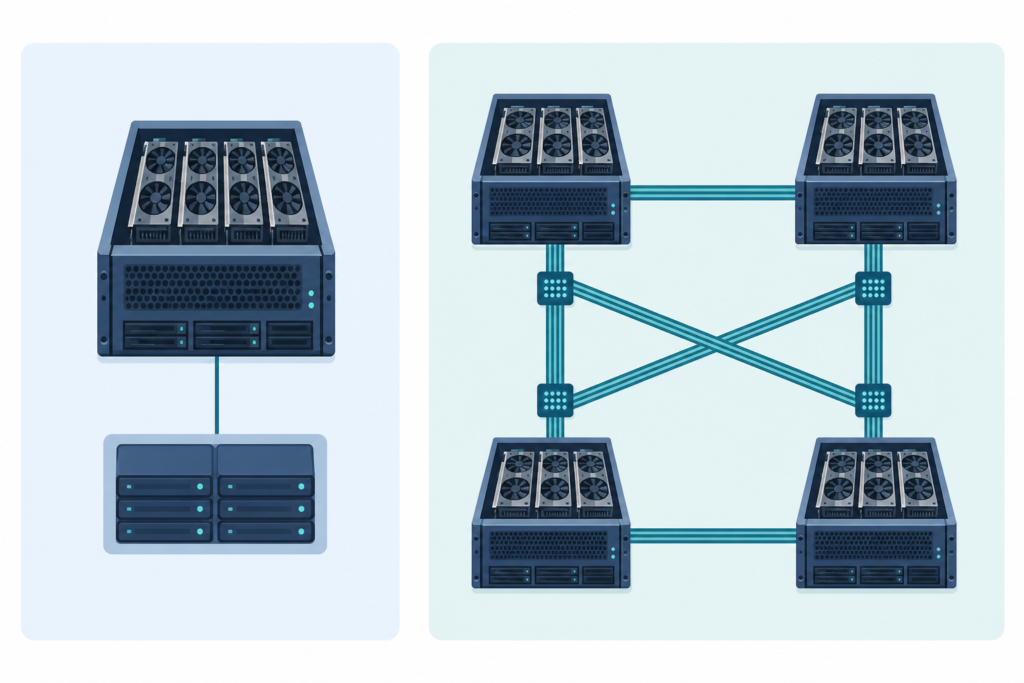
For multi-node distributed training—the workload where interconnect bandwidth makes or breaks throughput—Lambda’s Hyperplane cluster product uses NVIDIA InfiniBand (up to 3.2 Tbps aggregate bandwidth on H100 clusters). This is a critical differentiator from marketplace providers like Vast.ai that rarely guarantee InfiniBand. Standard on-demand instances use high-bandwidth Ethernet, which is sufficient for single-node training and inference but will bottleneck NCCL-heavy multi-node jobs.
Storage
Lambda provides persistent storage volumes (block storage) that survive instance termination, and a shared filesystem option for cluster workloads. Storage is priced separately—roughly $0.20/GB/month for persistent storage (verify current rates). There is no native object storage equivalent to S3; teams commonly pair Lambda compute with AWS S3 or Cloudflare R2 for dataset and checkpoint storage. Egress between Lambda and external storage is a cost and latency consideration worth planning for explicitly, especially for large model checkpoints.
Software Environment
Lambda instances boot with a pre-configured Lambda Stack: Ubuntu Linux with CUDA, cuDNN, PyTorch, TensorFlow, and common ML dependencies pre-installed and verified compatible. This is genuinely useful—getting CUDA driver versions to agree with framework versions is a real time-sink, and Lambda’s pre-baked environment eliminates most of that friction. You can also bring custom images. SSH access is standard; there’s a web-based terminal for quick access. Jupyter-style notebooks are supported via Lambda’s dashboard.
API and Automation
Lambda provides a REST API for programmatic instance management—spin up, list, terminate, manage SSH keys. This is useful for CI/CD pipelines that need to launch training runs automatically. The API is functional but not as feature-rich as AWS EC2 or GCP Compute Engine; don’t expect equivalents to IAM roles, VPC peering, or security group fine-grained policies out of the box. Terraform support exists via a community provider, which is worth noting for infrastructure-as-code shops.
Lambda Hyperplane: Private Multi-Node GPU Clusters
Lambda’s Hyperplane product targets teams that need dedicated multi-node clusters for large-scale distributed training—think 32, 64, or 128+ H100 nodes. These are private, reserved clusters with InfiniBand fabric, dedicated storage, and direct support. Pricing for Hyperplane is quote-based and typically involves a commitment term. For organizations running foundation model training or large-scale RLHF, Hyperplane is Lambda’s primary enterprise offering and is worth evaluating against CoreWeave’s similarly positioned products. If you’re at this scale, also review our how to choose a GPU cloud for large-scale AI training.
Lambda Labs Pricing: On-Demand vs Reserved
Lambda offers significant discounts for reserved capacity—typically in the range of 30–40% off on-demand rates for 1-year commitments. For teams with predictable, sustained GPU utilization (running training jobs or inference endpoints continuously), reserved pricing materially improves unit economics.
The math is simple: if your team uses a 1x H100 instance at ~$2.49/hr on-demand, that’s approximately $1,800/month. A 1-year reserved commitment at a ~35% discount brings this to roughly $1,170/month—saving around $7,560 over the year on a single GPU. Scale that across 8 GPUs and the savings compound fast. Verify exact reserved rates on Lambda’s official pricing page since these rates are updated periodically.
For budget forecasting and cost modeling, see our cloud GPU cost calculator guide for a framework you can adapt to Lambda’s actual pricing.
What Are Lambda Labs’ Biggest Weaknesses?
Limited Cloud-Native Ecosystem
Lambda is laser-focused on GPU compute. There are no managed databases, no serverless functions, no CDN, no managed message queues. If your architecture requires these components to live in the same cloud, you’ll be operating a multi-cloud setup by default. For ML-only pipelines this is often fine—but it adds operational overhead for teams not already comfortable with multi-cloud patterns.
Availability Constraints on Popular GPUs
High demand for H100 and A100 instances means on-demand availability can be intermittent. Lambda does not guarantee on-demand availability—if the inventory is sold out, you wait. For research teams that need to spin up 8x H100 on short notice, this is a real operational risk. Reserved instances or Hyperplane commitments mitigate this but require financial commitment.
Geographic Coverage
As of mid-2026, Lambda’s geographic footprint is primarily US-based. EU and APAC availability is limited. For teams with data residency requirements outside the US, this is a compliance blocker, not just a latency inconvenience.
No Managed Kubernetes
Lambda doesn’t offer a managed Kubernetes service as of mid-2026. Teams that want to run GPU workloads orchestrated via K8s need to self-manage the control plane, or use an external orchestration layer (Kubeflow, Ray on Lambda bare-metal, etc.). CoreWeave has a stronger story here for K8s-native AI platforms.
Support Tier Limitations
Standard Lambda support is email-based with no guaranteed SLA response time. Paid support tiers and Slack-based channels are available for larger customers, but this doesn’t match the tiered support SLAs of AWS or Azure for enterprise buyers. For production-critical inference services, this is worth weighing carefully.
Lambda Labs Performance: What to Expect in Practice
Lambda’s H100 SXM5 instances deliver the full NVIDIA H100 SXM spec: 80 GB HBM3 memory, 3.35 TB/s memory bandwidth, and NVLink for multi-GPU communication within a node. There’s no GPU virtualization penalty on single-tenant instances—what you’re getting is bare-metal GPU performance. Independent benchmark results from AI research teams (published on platforms like MLCommons and community blogs) consistently show Lambda’s H100 instances performing comparably to AWS p5 instances on per-GPU compute tasks, which is expected given the same underlying silicon.
Where Lambda has historically faced scrutiny is CPU-to-GPU data pipeline performance and storage throughput. If your training loop is I/O bound—reading large datasets from disk—the local NVMe performance on Lambda instances and the latency to external storage buckets can become bottlenecks. Profiling your data pipeline early (using PyTorch’s DataLoader profiler or NVIDIA Nsight) before committing to a long training run on Lambda is strongly recommended.
Lambda Labs Security and Compliance
Lambda maintains SOC 2 Type II certification, which is the baseline compliance requirement for most enterprise AI teams. Data encryption at rest and in transit is supported. However, Lambda is not currently certified for HIPAA BAA, FedRAMP, or PCI DSS as of mid-2026—regulated industries (healthcare, finance, government) should verify current compliance posture directly with Lambda before onboarding sensitive workloads. Lambda instances are single-tenant, which is a meaningful security property compared to shared GPU environments.
Getting Started with Lambda Labs: Step-by-Step
- Create an account at lambdalabs.com. Email verification is required; new accounts may have a brief review period before GPU access is unlocked.
- Add a payment method. Lambda requires a valid credit card or billing setup. Enterprise customers can arrange invoicing.
- Add SSH keys in the dashboard under your account settings. You’ll need this to connect to instances via terminal.
- Select an instance type from the cloud dashboard. Filter by GPU type, region, and availability. If your preferred type shows as unavailable, use the notification feature.
- Launch the instance. Choose your region and confirm. Boot times are typically under 2 minutes for standard instances.
- SSH in using the IP provided in the dashboard. The Lambda Stack environment is pre-loaded—CUDA, PyTorch, and common libraries are ready to use immediately.
- Run your workload. For large training jobs, consider mounting a persistent storage volume or syncing datasets from S3/R2 before starting training.
- Terminate the instance when done. Persistent volumes are retained separately; you are charged for them independently.
Is Lambda Labs Worth It? Our Verdict
Lambda Labs earns a strong recommendation for its target use case: cost-efficient GPU compute for AI/ML teams that don’t need a full cloud-native ecosystem. The pricing is genuinely competitive—often the lowest on-demand rates available for H100 and A100 instances among credible, enterprise-grade providers. The Lambda Stack reduces setup friction, and Hyperplane makes Lambda viable for large-scale distributed training that used to require hyperscaler budgets.
The weaknesses are real but scoped: limited geographic coverage, no managed K8s, constrained cloud-native services, and availability pressure on the most popular GPU types. Teams that run mixed workloads across GPU compute, managed databases, and serverless will find the multi-cloud integration overhead adds up.
Recommended for: AI research teams, ML engineers, startups doing foundation model fine-tuning, inference infrastructure teams optimizing cost.
Not recommended as a sole cloud for: Full-stack applications requiring cloud-native services, EU/APAC data residency requirements, or teams that need guaranteed on-demand H100 availability without a reserved commitment.
For teams evaluating multiple providers side by side, also review our best GPU cloud providers ranked for a broader market view.
About the Author
Nhon Dang is a cloud infrastructure and operations professional with over 10 years of hands-on experience in cloud services, infrastructure, and business operations. His expertise spans the design, deployment, and operation of cloud platforms and managed services, including virtual machines (VMs), Kubernetes (K8s), object storage (S3), managed databases, Apache Kafka, and cloud GPU infrastructure. Throughout his career, Nhon has worked closely with cloud infrastructure and service operations, gaining practical experience in building reliable, scalable, and cost-efficient cloud environments. He writes about cloud infrastructure, Kubernetes, DevOps, distributed systems, and cloud GPU providers—sharing insights grounded in real production experience rather than purely theoretical knowledge.
Frequently Asked Questions
Is Lambda Labs cheaper than AWS for GPU instances?
Yes, significantly. Lambda Labs on-demand pricing for H100 GPU instances is approximately 70–80% lower than AWS EC2 P5 instances for equivalent GPU count. For example, an 8x H100 node on Lambda costs roughly $19.92/hr on-demand versus approximately $98/hr on AWS. The trade-off is that Lambda doesn’t include AWS’s managed services ecosystem, so teams running mixed workloads may incur integration overhead that partially offsets the compute savings.
Does Lambda Labs offer reserved instances or long-term discounts?
Yes. Lambda offers 1-year and 3-year reserved pricing with discounts typically in the range of 30–40% off on-demand rates. Reserved instances are the recommended approach for teams with sustained, predictable GPU utilization—the annual savings can be substantial, especially at multi-GPU scale. Verify exact reserved pricing on Lambda’s official pricing page, as rates are updated periodically.
What GPUs does Lambda Labs offer?
As of mid-2026, Lambda Labs offers NVIDIA H100 SXM5 (80 GB), A100 SXM4 (40 GB), and A10 (24 GB) instances in single-GPU and 8-GPU configurations. H100 is the flagship option for large-scale training and inference. A100 nodes offer a strong price-performance balance for many fine-tuning and training workloads. A10 instances are well-suited for inference serving and lighter training tasks.
Is Lambda Labs good for distributed multi-node training?
Yes, with the right product. Lambda’s standard on-demand instances use Ethernet networking, which limits multi-node NCCL performance. For serious distributed training across multiple nodes, Lambda’s Hyperplane cluster product provides InfiniBand fabric (up to 3.2 Tbps aggregate bandwidth on H100 clusters), which is the interconnect required for efficient large-scale distributed training. Hyperplane is quote-based and requires a commitment.
Does Lambda Labs have a free tier or trial?
Lambda Labs does not offer a persistent free tier comparable to AWS Free Tier or GCP free credits as of mid-2026. New accounts may have access to promotional credits; check the Lambda website at sign-up for current offers. The low on-demand pricing makes it practical to test workloads for short periods at relatively low cost compared to hyperscalers.
What regions does Lambda Labs operate in?
Lambda’s primary infrastructure is US-based, with data centers in Texas and California. International region availability is limited as of mid-2026. Teams with EU or APAC data residency requirements may find Lambda’s current geographic footprint insufficient. Lambda has announced plans to expand, so check the current dashboard for the latest region availability.
Is Lambda Labs SOC 2 certified?
Yes, Lambda Labs maintains SOC 2 Type II certification. Instances are single-tenant, which provides meaningful security isolation. However, Lambda is not currently certified for HIPAA, FedRAMP, or PCI DSS as of mid-2026. Organizations in regulated industries should verify Lambda’s current compliance certifications directly before onboarding sensitive workloads.
How does Lambda Labs compare to CoreWeave for AI training?
Both Lambda and CoreWeave offer H100 clusters with InfiniBand for distributed training at prices well below hyperscalers. CoreWeave has a stronger managed Kubernetes offering (useful for K8s-native AI platforms) and broader geographic coverage. Lambda tends to have simpler, more transparent on-demand pricing and is often more accessible for teams that want to start quickly without a long-term contract. For large-scale private clusters, both offer comparable technical specs—the decision often comes down to contract terms, support, and ecosystem fit.