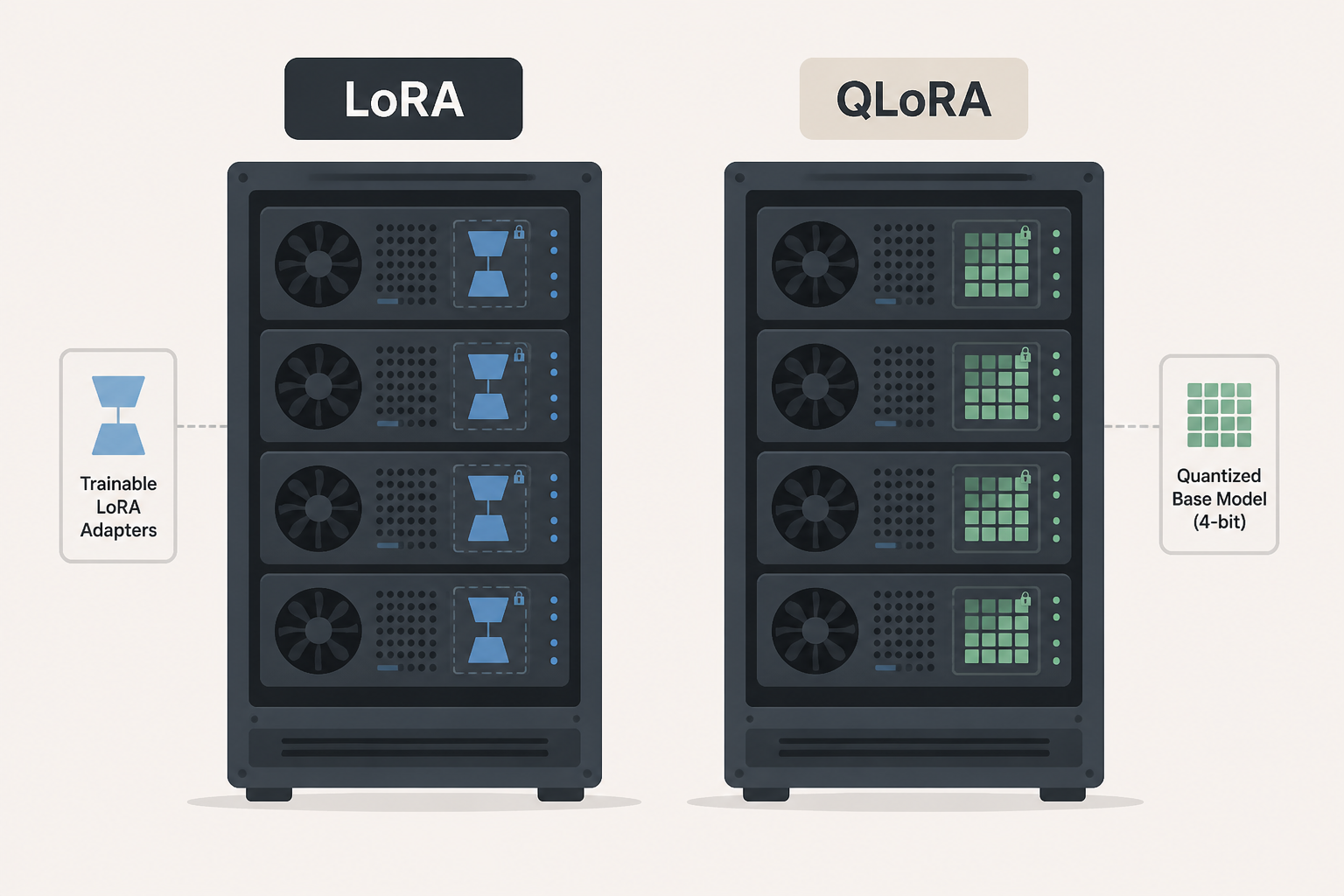

LoRA vs QLoRA: LoRA adapts large language models by adding small trainable adapters (low‑rank matrices), while QLoRA further reduces memory needs by quantizing the base model to 4‑bit during fine‑tuning.
This post may contain affiliate/partner links. If you buy or sign up through them, we may earn a commission at no extra cost to you.
Last updated: September 28, 2026
What is LoRA?
LoRA (Low‑Rank Adaptation) is an adapter‑based parameter‑efficient fine‑tuning method. You freeze the base model’s weights and train only small pairs of matrices (A and B) inserted into selected layers—typically attention layers—so only a tiny fraction of parameters is trained. ([modal.com](https://modal.com/blog/lora-qlora))
What is QLoRA?
QLoRA (Quantized LoRA) builds on LoRA by quantizing the frozen base model to 4‑bit precision (often NF4 type), reducing memory and storage overhead radically while still training LoRA adapters in higher precision. ([redhat.com](https://www.redhat.com/en/topics/ai/lora-vs-qlora))
How do LoRA and QLoRA compare?
| Aspect | LoRA | QLoRA |
|---|---|---|
| Base precision | FP16/FP32 | 4‑bit quantized (e.g., NF4) |
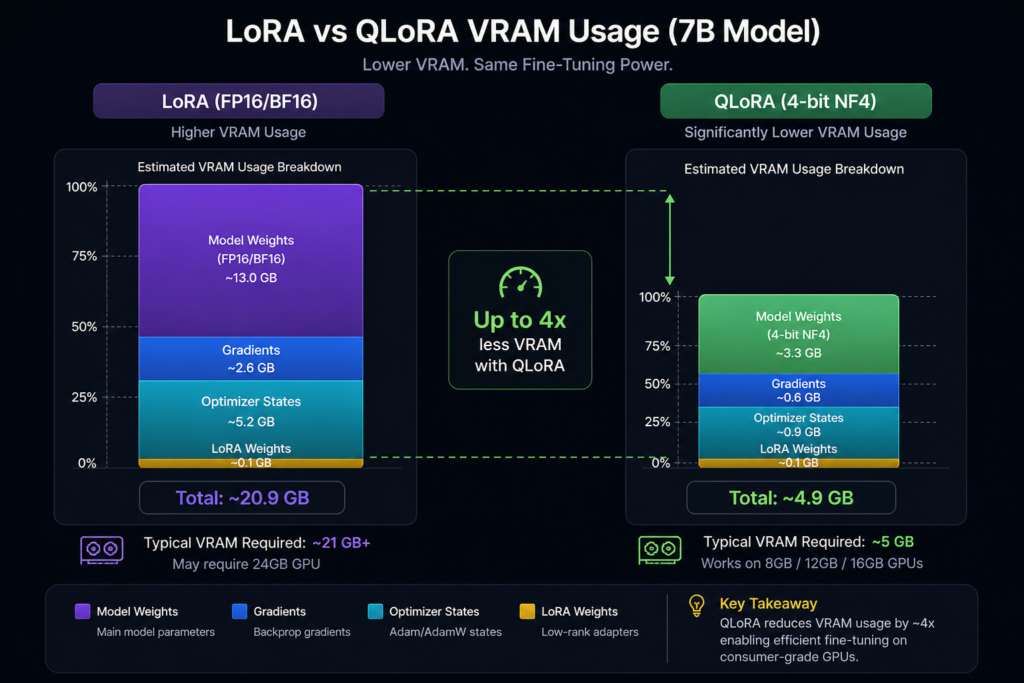
| Memory usage (approx.) | Moderate—e.g. ~16 GB VRAM for 7B model | Lowest—e.g. ~6–8 GB VRAM for 7B model, ~4× smaller than LoRA |
| Hardware requirement | Mid‑range GPUs | Consumer GPUs with <8 GB VRAM |
| Quality impact | Minimal | Generally close to LoRA; minor loss possible |
| Complexity | Simpler setup | More setup work (quantization and optimization tweaks) |
| Best when… | You have decent GPU and want maximum quality | Memory constrained; adapting large models on limited hardware |
Real‑world example: fine‑tuning a 7B model with LoRA needs ~16 GB VRAM, whereas QLoRA brings it down to ~6–8 GB; for 70B models, LoRA requires ~160 GB VRAM (impractical), while QLoRA can make it ~35–48 GB—still heavy, but viable on high‑end consumer GPUs. ([misar.blog](https://www.misar.blog/%40synor/articles/lora-vs-qlora-finetuning))
When to choose each?
- LoRA: Use when you have sufficient GPU memory, want top accuracy, simpler setup, and don’t need to squeeze into consumer GPU limits.
- QLoRA: Choose when you’re working with limited VRAM (e.g., 8–12 GB GPUs), or need to fine‑tune large models cost‑efficiently at home or in tight budget environments.
Both methods out‑perform full fine‑tuning in most focused adaptation tasks. Especially when you only need narrow behavior changes, LoRA or QLoRA delivers near‑full quality with far lower cost—full fine‑tuning still wins only when deep rewrites or broad domain shifts are essential. ([thepromptbench.com](https://thepromptbench.com/fine-tuning-and-adaptation/lora-and-qlora-explained/))
How memory scales across model sizes
Reference estimates (from Modal blog): ([modal.com](https://modal.com/blog/lora-qlora))
| Model Size | LoRA VRAM | QLoRA VRAM |
|---|---|---|
| 7B | ~16 GB | ~6 GB |
These are illustrative; actual consumption depends on optimizer, batch size, training framework, and quantization strategy.
Key benefits and trade‑offs
- Memory efficiency: QLoRA enables fine‑tuning of very large models on consumer hardware.
- Modularity: LoRA adapters are small (tens to hundreds of MB), easy to swap or share; maintain clear metadata about base and adapter pairing. ([tensorarchive.ai](https://tensorarchive.ai/wiki/lora-vs-qlora/))
- Performance: Loss from quantization in QLoRA is often negligible, sometimes it even provides a regularizing effect. E.g. on ViT tasks accuracy drop ~0.23 pp with 69 % memory reduction. ([openreview.net](https://openreview.net/pdf?id=RXSZ1EsjTJ))
- Complexity: QLoRA setups require quantization tools, NF4 support, and careful optimizer handling—slightly higher technical overhead.
Step‑by‑step decision guide
- Assess your GPU VRAM.
- If ≥16 GB: prefer LoRA for maximum fidelity and simplicity.
- If <12 GB: QLoRA likely the only feasible adapter method for large models.
- When adapting multiple tasks or swapping behaviors: use LoRA adapters with clear tracking.
- For extreme conditions (low data, low memory): QLoRA often still holds up well. ([openreview.net](https://openreview.net/pdf?id=RXSZ1EsjTJ))
- Always record base model details, config, and adapter metadata to ensure recoverability. ([tensorarchive.ai](https://tensorarchive.ai/wiki/lora-vs-qlora/))
Illustrative workflow comparison
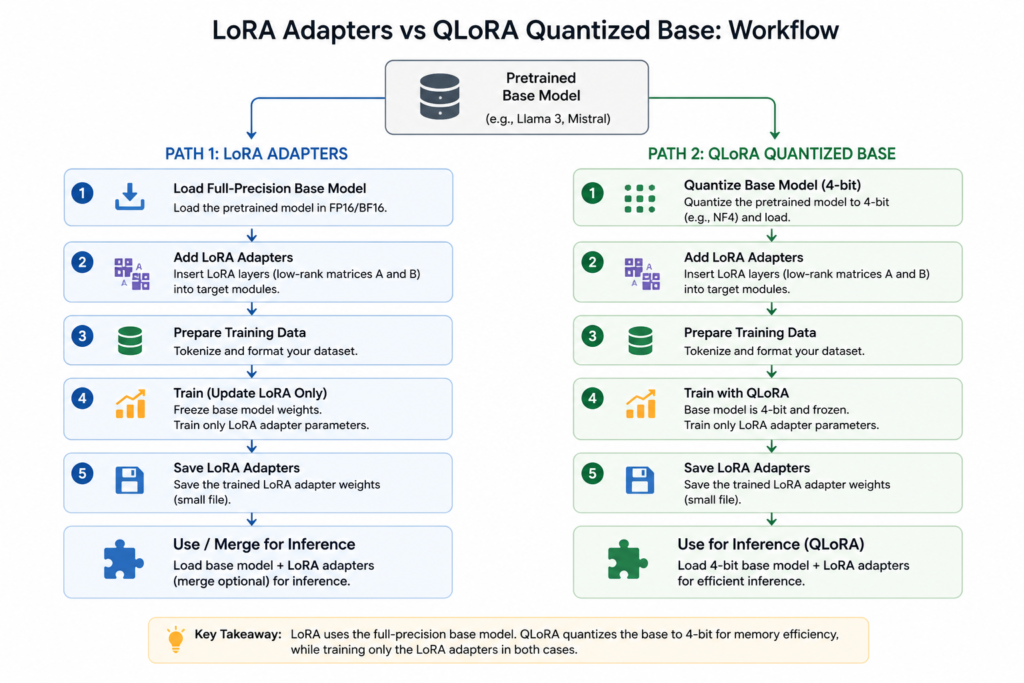
LoRA workflow
- Load base model in FP16
- Insert LoRA adapters into layers
- Fine‑tune (train only adapters)
- Save adapter + metadata
- At inference, merge or load adapter on base
QLoRA workflow
- Quantize base model to 4‑bit (NF4)
- Load quantized base with paged optimizers/double quantization
- Insert and train LoRA adapters (FP16/bfloat16)
- Save adapter + quant config metadata
- Inference by loading base+adapter or merging
Inline illustration: visualize memory footprint comparison between LoRA and QLoRA.
Frequently Asked Questions
What is the main difference between LoRA and QLoRA?
LoRA fine‑tunes models by training small low‑rank adapter matrices on a frozen full‑precision base. QLoRA adds 4‑bit quantization of the base model to further reduce memory usage during fine‑tuning.
Does quantizing the base reduce model quality?
In most cases, QLoRA matches LoRA’s quality closely. Some experimental results (e.g., on vision tasks) show only ~0.2pp accuracy loss while cutting memory use by ~69 %.
Which method should I start with?
If you have ≥16 GB VRAM, start with LoRA—it’s simpler and offers high fidelity. If you’re memory‑constrained (<12 GB), QLoRA allows you to fine‑tune large models on consumer hardware.
Can I switch between adapters for different tasks?
Yes. LoRA adapters are modular and small. You can swap them on the same base model; just track which base version each adapter expects.
When is full fine‑tuning still necessary?
Full fine‑tuning updates all model weights and is preferred when you need deep, broad behavior changes or the domain is far from the base model’s training data—and you have the compute budget.