
Deploying an LLM with vLLM allows you to get a high‑throughput, OpenAI‑compatible inference service fast—whether it’s a single GPU pod for development or a scaled multi‑GPU Kubernetes stack for production.
What is vLLM?
vLLM is an open‑source inference server that provides fast, GPU‑optimized, OpenAI‑compatible LLM serving built with high throughput and flexible deployment methods. It supports pip, Docker, and Kubernetes modes and comes with options for data/tensor/pipeline‑parallel scaling and routing logic. ([docs.vllm.cc](https://docs.vllm.cc/en/latest))
How do I install and run vLLM for basic serving?
Follow these steps to get started with local or single‑node serving:
- Install in a Python environment (Linux/macOS) via pip—use uv or conda. For NVIDIA GPUs:
uv pip install vllm --torch‑backend=auto. For AMD (ROCm), use an extra index URL. ([github.com](https://github.com/vllm-project/vllm/blob/main/docs/getting_started/quickstart.md)) - Run the OpenAI‑API compatible server with your model:
vllm serve facebook/opt‑125m, optionally specifying--hostand--port. ([github.com](https://github.com/vllm-project/vllm/blob/main/docs/getting_started/quickstart.md)) - Send queries using OpenAI‑style API:
curl localhost:8000/v1/completions …or via Python OpenAI client by pointing its base_url at the vLLM server. ([github.com](https://github.com/vllm-project/vllm/blob/main/docs/getting_started/quickstart.md))
What are my scaling options with vLLM?
vLLM supports multiple scaling strategies:
- Data Parallel (DP): replicate model weights across GPUs for independent batching; use
--data‑parallel‑size=Nand optional tensor parallel. Internal or external load balancing possible. ([docs.vllm.cc](https://docs.vllm.cc/en/latest/serving/data_parallel_deployment/)) - Tensor / Pipeline Parallel: split a single model across GPUs or nodes. Use
--tensor‑parallel‑sizeand--pipeline‑parallel‑size; supports multi‑node via Ray or multiprocessing. ([github.com](https://github.com/vllm-project/vllm/blob/main/docs/serving/parallelism_scaling.md)) - Kubernetes / Helm / Production Stack: production‑ready deployments using Helm charts or custom CRDs. The vLLM production stack includes observability, routing, KV‑cache offloading, and simple model spec in YAML. ([docs.vllm.ai](https://docs.vllm.ai/en/v0.17.0/deployment/integrations/production-stack/))
What does deployment look like by environment?
Docker or local single pod
Run vLLM in Docker with an OpenAI‑compatible server: image vllm/vllm‑openai:latest. Suitable for dev or small workloads. Add reverse proxy and GPU flags as needed. ([mintlify.com](https://www.mintlify.com/vllm-project/vllm/deployment/production-guide))
Kubernetes via Helm or native manifests
Use Helm chart to deploy on K8s cluster with GPU plugin, S3 model storage, and variable overrides. Example values include replicaCount, resource requests, and modelURL. ([docs.vllm.cc](https://docs.vllm.cc/en/latest/deployment/frameworks/helm.html?utm_source=openai))
The production stack simplifies setup via Helm, and offers a built‑in router, observability dashboards (Grafana), model‑aware routing, and cache offloading. Example deploy sequence:
- Add Helm repo and install vLLM stack with minimal values YAML. ([docs.vllm.ai](https://docs.vllm.ai/en/v0.17.0/deployment/integrations/production-stack/))
- Verify pods via
kubectl get pods. ([docs.vllm.ai](https://docs.vllm.ai/en/v0.17.0/deployment/integrations/production-stack/)) - Port‑forward the router service and send API requests. ([docs.vllm.ai](https://docs.vllm.ai/en/v0.17.0/deployment/integrations/production-stack/))
Data‑parallel multi‑GPU / multi‑node
Use DP mode to horizontally scale. E.g., on one machine: vllm serve MODEL --data‑parallel‑size 4 --tensor‑parallel‑size 2 uses 8 GPUs. ([github.com](https://github.com/vllm-project/vllm/blob/main/docs/serving/data_parallel_deployment.md))
For multi‑node, coordinate with --data‑parallel‑address, --data‑parallel‑rpc‑port, and headless flags. External load balancing may be needed. ([github.com](https://github.com/vllm-project/vllm/blob/main/docs/serving/data_parallel_deployment.md))
What are the trade‑offs between deployment modes?
| Deployment Type | Pros | Cons | Best For |
|---|---|---|---|
| Single GPU container | Simple, fast setup, low cost | No scaling, single point of failure | Development, PoC |
| Data / tensor / pipeline parallel | High throughput, efficient GPU use | Complex config, GPU coordination | Production serving under load |
| Kubernetes + Production Stack | Scalable, observability, routing, caching | Infra cost, learning curve | Enterprise / multi‑model deployments |
How do I choose the right deployment for cost‑efficient cloud operations?
Start small. Begin with a single‑node container to validate behavior. Measure QPS, latency, and GPU usage under typical load.
As load increases, shift to DP or tensor/pipeline parallel modes to scale within GPU clusters efficiently.
For sustained or multi‑tenant workloads, invest in Kubernetes production stack—leveraging features like routing, cache offload, KV caching—to reduce per‑request cost and operational overhead.
Workflow: Step‑by‑Step to Production
- Develop locally with pip or Docker-based vLLM service.
- Benchmark under realistic load using automated scripts.
- Scale via data‑parallel on multi‑GPU or multi‑node, track throughput gains.
- Shift to Kubernetes + production stack for operating at scale with observability and routing.
- Add autoscaling, failure recovery, model versioning as needed.
Illustrations
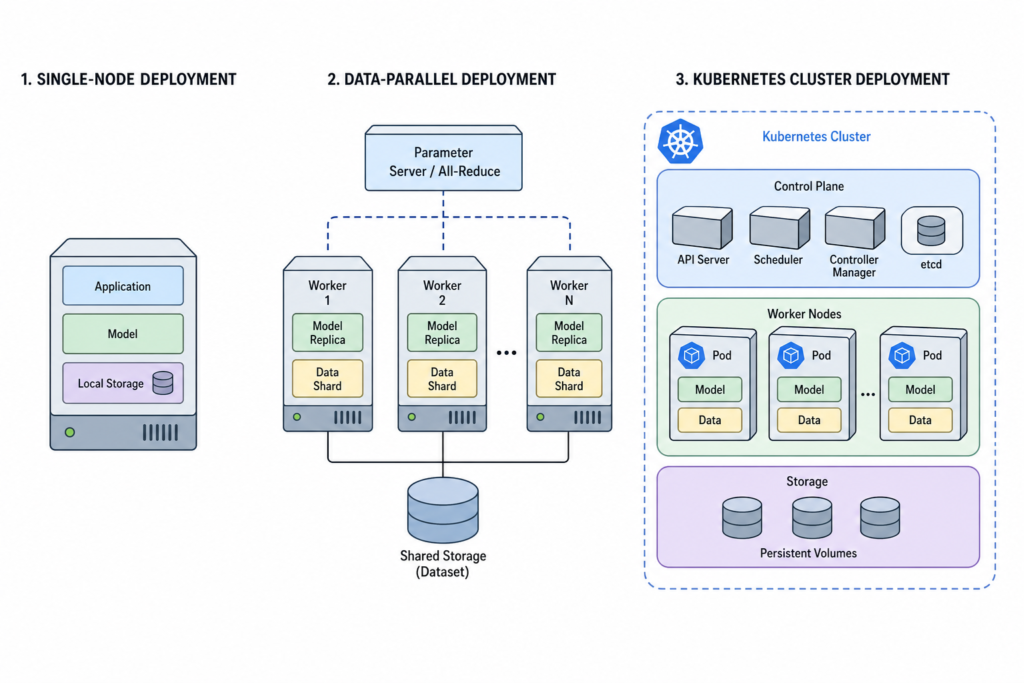
Illustration 1: architecture diagram comparing single‑node, data‑parallel, and Kubernetes production stack topologies.
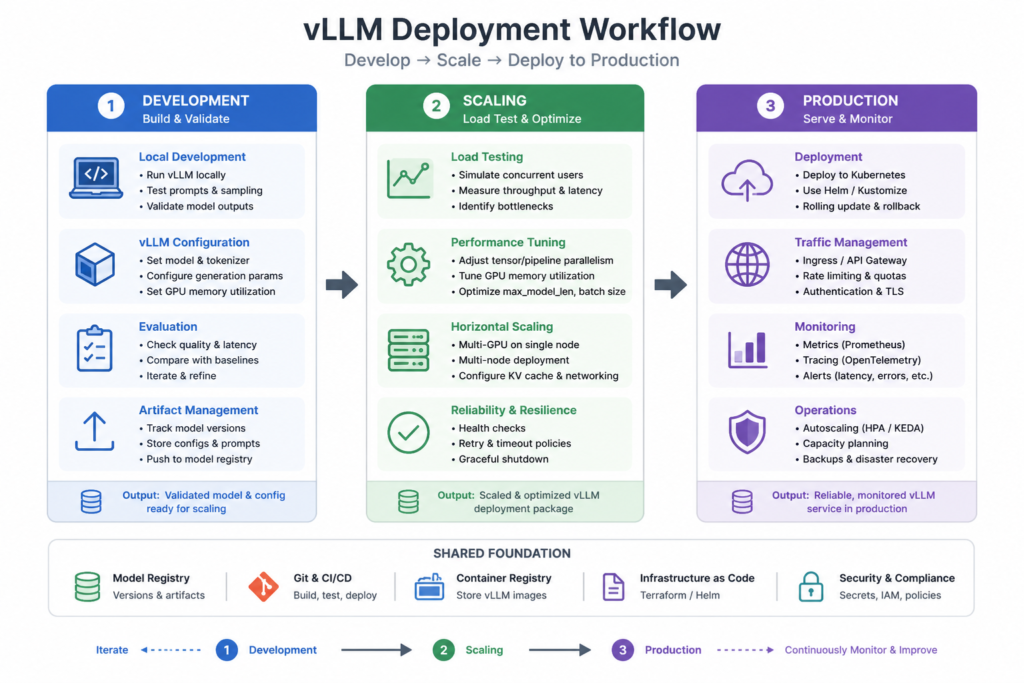
Illustration 2: workflow flowchart from development → scaling → production stack deployment.
Frequently Asked Questions
- What GPU memory is needed to deploy a 13B model? It depends on float‑precision, parallel mode, and KV cache—benchmark first; flag in “verify_before_publish”.
- Can I use vLLM on CPU only? Yes for testing, but expect very low throughput. GPUs are strongly recommended for production. ([docs.vllm.ai](https://docs.vllm.ai/en/stable/deployment/k8s/))
- Does vLLM support OpenAI API key enforcement? Yes—use
--api‑keyor environment variableVLLM_API_KEYat serve time. ([github.com](https://github.com/vllm-project/vllm/blob/main/docs/getting_started/quickstart.md)) - Can I serve multiple models? Production stack supports multi‑model routing; local serve command supports one model at a time. ([docs.vllm.ai](https://docs.vllm.ai/en/v0.17.0/deployment/integrations/production-stack/))
- How do I choose between tensor vs pipeline parallel? Use tensor parallel within a node, pipeline when spanning across nodes. Combine both to match GPU count and latency targets. ([github.com](https://github.com/vllm-project/vllm/blob/main/docs/serving/parallelism_scaling.md))
About the Author
cloudgpuhub.com – Nhon Dang is a cloud infrastructure and operations professional with over 10 years of hands‑on experience in cloud services, infrastructure, and business operations. His expertise spans the design, deployment, and operation of cloud platforms and managed services, including virtual machines, Kubernetes, object storage, managed databases, Apache Kafka, and cloud GPU infrastructure.
Nhon writes practical, technically accurate, experience‑driven guidance to help engineers, technical teams, and businesses make better decisions in real‑world cloud environments.