
Last updated: September 21, 2026
RTX 5060 for local LLMs: Quick answer
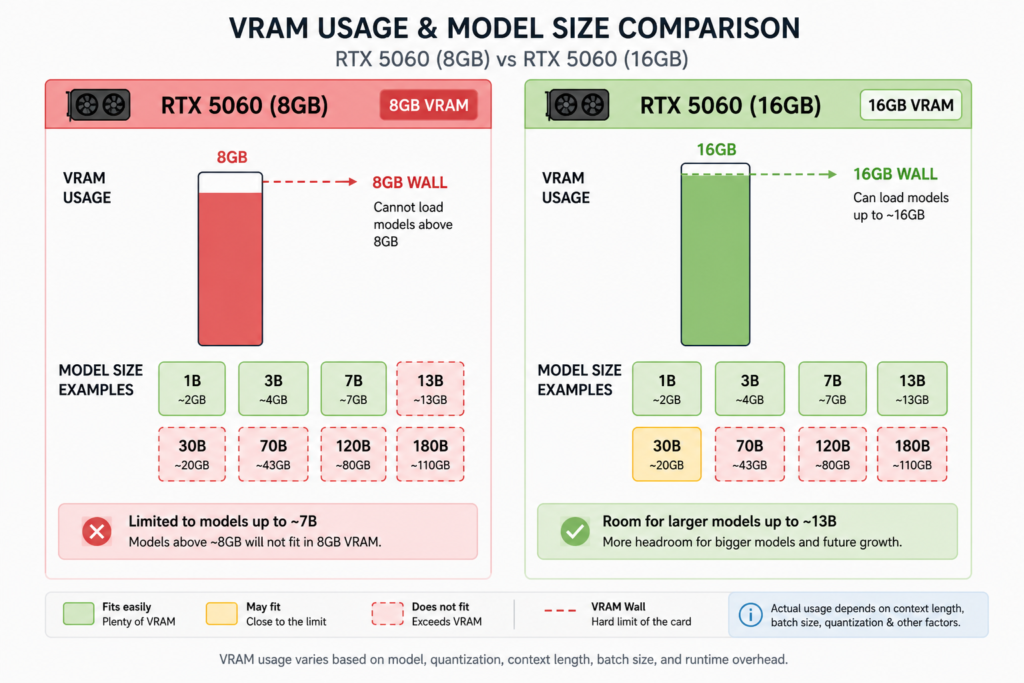
The RTX 5060 has 8 GB of GDDR7 VRAM and Blackwell tensor cores, letting you run 7 B to 9 B local language models (LLMs) with Q4‑style quantization at decent speed—but 8 GB is a hard ceiling. Models above ~11–13 B require offloading or aren’t feasible for serious use.
What is RTX 5060 and why it matters for local AI
The RTX 5060 is a GeForce GPU based on NVIDIA’s Blackwell architecture, featuring 5th‑generation tensor cores and 8 GB of GDDR7 memory. It delivers high memory bandwidth (~448 GB/s) at a $299–$329 street price, making it one of the most affordable Blackwell GPUs for entry‑level local AI inference workloads. ([compute-market.com](https://www.compute-market.com/blog/rtx-5060-local-ai-review-2026?utm_source=openai))
What models actually fit in 8 GB on the RTX 5060?
Multiple real-world tests and telemetry show which models the RTX 5060 can run without swapping:
- TurboLLM users measured Qwen3.5‑9 B at ~44 tokens/sec at 35 K context; LFM2.5 2.6 B hit ~115 tokens/sec (Q8_0 quant) ([turbollm.dev](https://turbollm.dev/gpu/rtx-5060?utm_source=openai)).
- ailocalcheck tracks 26 models that fit entirely in VRAM—like LFM2.5‑2.6 B (~5.9 GB, ~79.5 t/s), Qwen3‑4 B (~6.1 GB, ~84.9 t/s), and Qwen2.5‑3 B (~7.3 GB, ~63.2 t/s) ([ailocalcheck.com](https://ailocalcheck.com/hardware/rtx-5060-8gb?utm_source=openai)).
- LLM Configurator (July 2026) reports models such as Qwen 3 8 B (~5.8 GB) and GLM‑6 9 B (~6.2 GB) fit in 8 GB VRAM with large context windows (up to 125 K tokens) ([llmconfigurator.com](https://llmconfigurator.com/en/best-models/rtx-5060?utm_source=openai)).
How fast is inference (tokens/sec)? Real benchmarks
- TurboLLM: Qwen3.5‑9 B → 44 t/s; LFM2.5 2.6 B → 115 t/s ([turbollm.dev](https://turbollm.dev/gpu/rtx-5060?utm_source=openai)).
- Ollama + llama.cpp guide (TechFuelHQ): Qwen 2.5 7 B Q4_K_M uses ~4.7 GB and runs ~58 t/s; beyond ~13 B causes VRAM thrashing (~5 t/s) ([techfuelhq.com](https://techfuelhq.com/tutorials/self-host-local-llm-rtx-5060-2026/?utm_source=openai)).
- RunAIHome: RTX 5060 runs 7–8 B models at about ~30 t/s, but can’t run 13 B+ ([runaihome.com](https://runaihome.com/blog/rtx-5060-local-ai-8gb-gddr7-2026/?utm_source=openai)).
- GPU Battle (estimate): Llama 3.1 8 B ~81 t/s; Qwen3 4 B ~126 t/s (anchored estimate, not measured) ([gpubattle.com](https://gpubattle.com/ai/geforce-rtx-5060?utm_source=openai)).
What breaks when you go bigger than 8 GB?
Any models larger than ~11–13 B exceed GPU VRAM and force offloading to system RAM or disk—which drastically reduces speed and reliability.
- Models like Qwen3‑Coder‑30 B, vision‑enabled AI, long context workflows or agents with tool state often trigger heavy offloading or swapping, impacting performance badly ([reddit.com](https://www.reddit.com/r/LocalLLM/comments/1ua3q8p/rtx_5060_8gb_is_limiting_my_local_browser/?utm_source=openai)).
- Tech reviewers describe the 8 GB VRAM as a “hard ceiling”—for more serious local AI beyond casual use, they recommend skipping the 5060 ([runaihome.com](https://runaihome.com/blog/rtx-5060-local-ai-8gb-gddr7-2026/?utm_source=openai)).
Comparison: RTX 5060 8 GB vs other options
| GPU | VRAM | Bandwidth | Max practical model | Tokens/sec |
|---|---|---|---|---|
| RTX 5060 (8 GB) | 8 GB | ≈448 GB/s | Up to ~9 B comfortably; ~11 B possible with offload | 30–115 t/s depending on model |
| RTX 5060 Ti (16 GB) | 16 GB | ≈448 GB/s | Up to ~30 B+ (with CPU‑MoE offload) | 30 t/s on 14 B, more on smaller |
| Used RTX 3090 (24 GB) | 24 GB | ≈936 GB/s | 70 B+ possible | Varies |
Source: RunAIHome comparison table ([runaihome.com](https://runaihome.com/blog/rtx-5060-local-ai-8gb-gddr7-2026/?utm_source=openai)); TechFuelHQ offload benchmarks ([techfuelhq.com](https://techfuelhq.com/tutorials/self-host-local-llm-rtx-5060-2026/?utm_source=openai)).
Step‑by‑step: Setting up a local LLM on RTX 5060
- Choose a GGUF‑format model within 8 GB VRAM (e.g., Qwen 3 8 B, LFM2.5 2.6 B).
- Quantize to Q4 or similar to reduce memory footprint, if needed.
- Use a local inference engine like llama.cpp, Ollama, or TurboLLM with VRAM‑fit checks.
- Benchmark tokens/sec when cold and during chat—TurboLLM auto‑benchmarks on load ([turbollm.dev](https://turbollm.dev/gpu/rtx-5060?utm_source=openai)).
- If VRAM is tight, consider low‑latency extended offloading options (CPU‑MoE); expect drops to ~5–10 t/s on 13 B+ models ([techfuelhq.com](https://techfuelhq.com/tutorials/self-host-local-llm-rtx-5060-2026/?utm_source=openai)).
- For more headroom or future‑proofing, consider saving up for a 16 GB card (RTX 5060 Ti) or multi‑GPU setup. Dual‑5060 Ti setups can pool VRAM to 32 GB ([reddit.com](https://www.reddit.com/r/LocalLLaMA/comments/1mvts3i?utm_source=openai)).
Should you buy an RTX 5060 for local AI?
If you’re on a tight budget (<$350) and want to tinker with lightweight local LLMs (7–9 B), the RTX 5060 is a solid choice—fast enough, affordable, and future‑capable. But if your use case involves models above ~11 B, long contexts, vision, agents, or serious deployment, the 8 GB VRAM is a ceiling you’ll outgrow fast.
Frequently Asked Questions
What’s the largest model that RTX 5060 can run locally?
Typically up to ~11 B with quantization and careful context tuning. Fully native fit models are in the 7–9 B range. Above that, performance drops sharply due to VRAM limits.
How fast is inference on RTX 5060?
Benchmark results vary: ~30 tokens/sec for 7–8 B models; up to ~115 tokens/sec on LFM2.5 2.6 B; more realistic 7–9 B models run 40–80 t/s. Exact speed depends on model, quant, and engine.
Can I use CPU offloading to go beyond 8 GB?
Yes—engines like llama.cpp support CPU‑MoE or host‑RAM offload. But you’ll see token/sec drop into single digits (~5 t/s), making it impractical for responsive use.
Is the RTX 5060 Ti worth the upgrade?
For local AI, yes. With 16 GB VRAM, you can run ~14 B models natively and even stretch into 30 B with expert offload—at similar bandwidth but double VRAM.
Can I build a dual‑GPU system with RTX 5060 Ti?
Yes—dual RTX 5060 Ti setups can pool VRAM to 32 GB and support large-context, multi-modal LLM pipelines cost‑effectively. Common in enthusiast builds ([reddit.com](https://www.reddit.com/r/LocalLLaMA/comments/1mvts3i?utm_source=openai)).
Further Reading
- Check our deep dive on dual‑GPU configurations and inference pipelines dual GPU inference guide.
- Step‑by‑step self‑hosting with Ollama and llama.cpp self-host local LLMs.